


Still turning around at highway speed?
OwlView puts your baby on the screen you already watch — right next to your map. No mirror drift. No second screen. No wires front to back.
- 1080P live view on your factory CarPlay screen
- No-glow night vision — sees clearly in complete darkness
- 150° wide angle, 360° rotation — front or rear-facing
- Sets up in under 2 minutes — no tools, no wires to the front
90-day money back guarantee. Ships in 1-2 business days.
Why your mirror and wired camera still leave you guessing
If you have tried something and you are still turning around — here is the mechanical reason it keeps failing.
Mirrors drift — and go dark the moment you need them
The ball joint loosens on bumpy roads and the mirror falls out of position. At night it works about as well as reading a text message in a dark hallway: it does not. You need two mirrors to be perfectly aligned and adequate ambient light at all times.
Wired dash monitors add a second screen you have to hunt for
A separate monitor glued to your windshield or dash means your eye travels away from the road to find another screen. It blocks your charger, clutters your console, and runs a cord the full length of the car.
Neither shows up where you already look
Your eyes are trained to find the factory CarPlay screen — that is where your map lives. Every other solution asks you to look somewhere else entirely. OwlView puts your baby exactly where your eyes already go.
How OwlView works
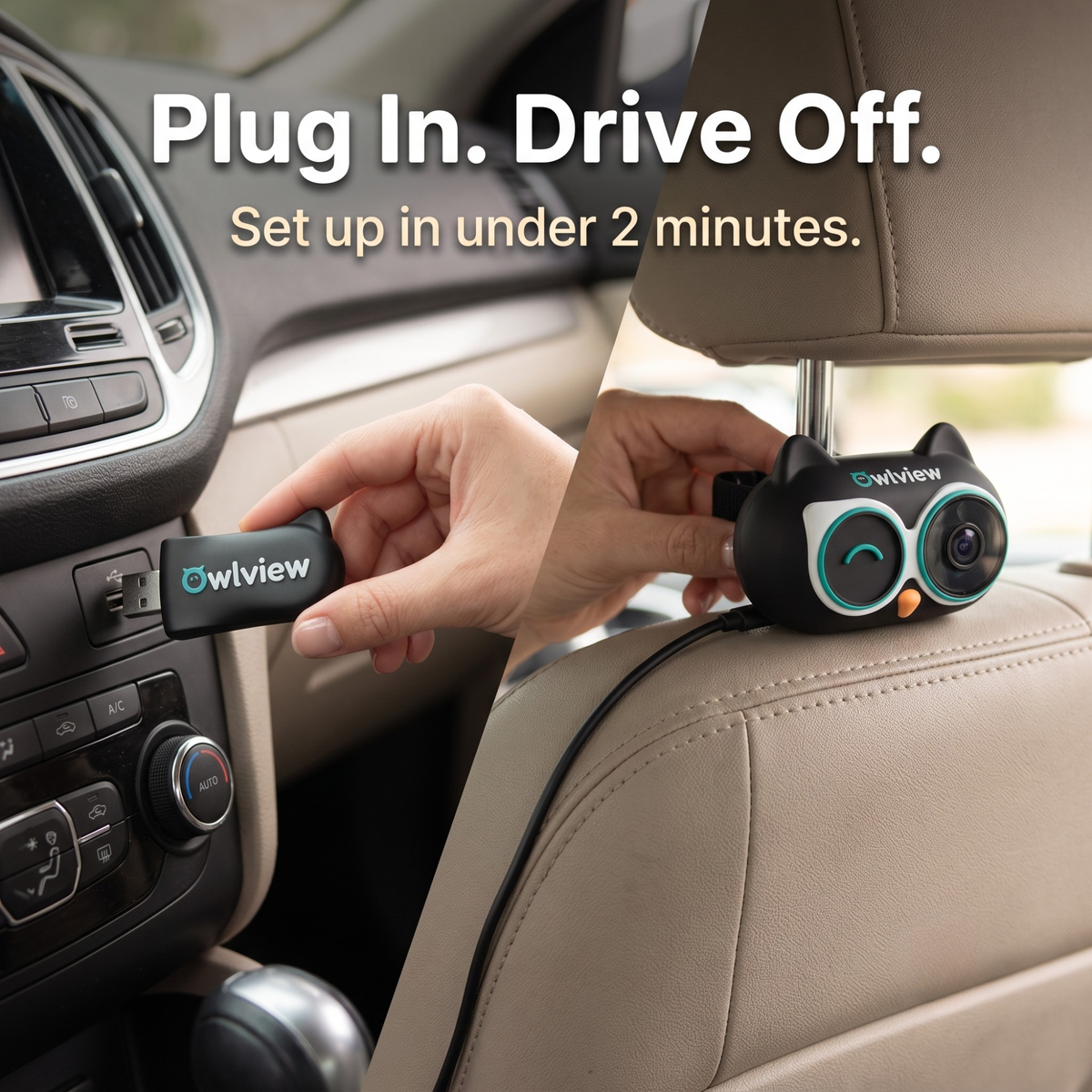
One wire stays in the back seat. Everything else is wireless. Your baby appears on the screen you are already watching.
Clip the owl camera to the headrest post
Use the metal bar clip for a vibration-free fit, or the velcro strap on any headrest. Plug the camera's short USB-C cable into the rear power port or a portable charger. No wire goes to the front.
Plug the small receiver into your front USB port
The dongle is smaller than a USB drive. It connects to your car's CarPlay data port — the same one your iPhone normally uses. That is the only setup in the front of the car.
Your baby appears on your factory screen automatically
Open the Camera app on your CarPlay screen. Choose full screen, split with your map, or picture-in-picture. After the first pairing, it connects within about 30 seconds every time you start the car — no app needed.
What parents say after the first drive
"I tried the mirror and a wired camera with a screen on the dash. Both were gone within a week. OwlView set up in under 5 minutes and she is right next to my GPS now. I do not turn around anymore."
Sarah M. — mom of 1, 4 months postpartum"The mirror kept falling on bumpy roads and was completely useless at night. This showed up on my factory screen the first time I plugged it in. I genuinely wish I had found it three months ago."
Jessica T. — first-time mom, Hyundai Tucson"My husband installed it while I was inside. By the time we backed out of the driveway she was on the screen. I kept waiting for a downside and never found one. Absolutely worth every penny."
Amanda R. — mom of 2, Chevrolet SuburbanSees clearly in the dark — no glow, no disruption
The mirror becomes useless the moment the sun goes down. OwlView uses 940nm infrared — the same wavelength as your home baby monitor — so you see a clear picture in complete darkness without a red glow waking your baby or distracting you.
- 940nm no-glow infrared — invisible to your baby
- Auto day-to-night switching — no setting to change
- Clear enough to see face, hands, and harness position
Three ways to watch — all on your existing screen
Choose the view that fits your drive without stopping. Full screen when you want a clear look. Split screen when you need your map. Picture-in-picture when you want minimal interruption. All controlled with a single tap.
- Full screen — baby fills the factory display
- Split screen — baby beside your map or music
- Picture-in-picture — movable corner thumbnail
Nothing runs down the length of your car
Every wired baby camera asks you to tuck a cord under the headliner or along the door sill, then re-route it when you swap cars. OwlView keeps its only cable in the back seat, where the camera already is. The front end is a dongle the size of a house key.
- One short USB-C cable, back seat only
- Moves between cars in about a minute
- No trim panels to pry, no adhesive, no tools
OwlView next to what you have already tried
The same four questions every parent ends up asking after the first week.
| OwlView | Backseat mirror | Wired dash monitor | |
|---|---|---|---|
| Shows on your factory CarPlay screen | Yes | No | No |
| Works in complete darkness | 940nm no-glow IR | No | Usually red-glow IR |
| Stays aimed on rough roads | Clamped to the headrest post | Drifts | Depends on the mount |
| Wire running front to back | None | None | Full length of the car |
| Setup time | Under 2 minutes | 1 minute | 20-40 minutes |
| Extra screen to look at | No | No | Yes |
What arrives in the box
Everything you need for the first drive. Nothing to buy separately.
Included
- OwlView 1080P camera with 360° rotating head
- CarPlay receiver dongle
- Metal headrest-post clip and adjustable velcro strap
- Short USB-C power cable for the back seat
- Illustrated setup card — no app download
Free shipping. Ships in 1-2 business days.
90-day money back guaranteeDrive with it for three months. If you still find yourself turning around, send it back for a full refund.
Questions parents ask before ordering
You need a car with wired CarPlay and an iPhone. If you normally plug your phone into a USB port to get CarPlay on your factory screen, OwlView will work.
It does not work with wireless-only CarPlay, with Android Auto, or with aftermarket head units that do not support CarPlay.
Yes. Split screen puts the camera beside your map, and picture-in-picture shrinks it to a corner thumbnail you can move. Your phone stays connected through the dongle the whole time, so calls, music and navigation carry on as normal.
A short USB-C cable runs from the camera to a rear USB port, a 12V adapter, or any portable battery pack. That cable stays entirely in the back seat — nothing is routed to the front of the car.
OwlView uses 940nm infrared at low intensity — the same wavelength used by home baby monitors. It produces no visible red glow, so there is nothing for your baby to look at and nothing that will wake them.
No. It is a live view only — nothing is recorded, stored, or uploaded. The camera talks directly to the receiver in your dash, so it needs no Wi-Fi, no cell signal, and no account.
Send it back within 90 days for a full refund. If it is a setup problem rather than a fit problem, message us first — most cases are solved by moving the dongle to a different USB port.
More from the back seat
"Night drives home from my parents' place used to be the worst part of the week. Now I just glance right."
Nicole B."Moved it from the Civic to the rental in about a minute. That alone sold me."
Derek P."Split screen with Waze is the whole product for me. Map on one side, him on the other."
Priya S."Third camera I have bought. First one I have kept past a month."
Hannah W.Keep your eyes forward
One clip on the headrest, one dongle in the dash, and she is on the screen you were already looking at.
Free shipping · 90-day money back guarantee · Ships in 1-2 business days